

LLAS-300 Light and Sound Sensor PoE Power Supply Connection Guide
Overview
The LLAS-300 Light and Sound Sensor is a high-precision monitoring device designed for digital cinema environments. It supports IEEE 802.3af/at Power over Ethernet (PoE) and operates as a standard Powered Device (PD).
With PoE technology, the LLAS-300 integrates power supply and data communication through a single RJ45 Ethernet interface, eliminating external power adapters and reducing cabling complexity.
This design significantly simplifies installation and improves system reliability in cinema monitoring systems and Theater Management Systems (TMS).
Key benefits include:
- Single-cable installation (Power + Data)
- Simplified infrastructure deployment
- Reliable PoE power negotiation
- Seamless integration with cinema networks
Hardware Requirements
Ethernet Cable Specifications
Parameter | Specification |
Cable Type | Cat5e / Cat6 / Cat6a |
Wiring | 8-wire full pair Ethernet |
Maximum Distance | 100 meters (328 ft) |
Connector | Standard RJ45 |
⚠ Important
Using 4-wire Ethernet cables is not supported.
Incomplete wiring may cause:
- PoE power instability
- Packet loss
- Random device disconnection
Always ensure all 8 conductors are present.
Recommended PoE Hardware
Hardware Type | Model Example | Price (USD) | Features |
PoE Switch | TP-Link TL-SF1005P | $35-50 | 4 PoE+ ports |
PoE Switch | Netgear GS308P | $70-90 | Gigabit, metal chassis |
PoE Injector | Ubiquiti U-POE-af | $15-25 | Compact and reliable |
PoE Injector | TP-Link TL-POE150S | $18-30 | IEEE 802.3af compliant |
Deployment Topologies
Two installation methods are commonly used in cinema environments.
Method A
Direct PoE Switch Connection (Recommended)
This method is recommended for:
- New cinema installations
- Networks already equipped with PoE switches
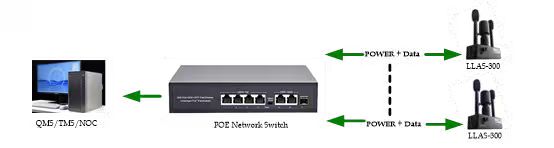
The PoE switch automatically negotiates power with the LLAS-300 using IEEE 802.3af protocol.
Network Topology
Connection Steps
- Connect the LLAS-300 RJ45 port to a PoE-enabled switch port.
- Use Cat5e or Cat6 Ethernet cable.
- Connect the switch uplink to the Cinema Server or TMS network.
- The switch will automatically provide 802.3af power (up to 15.4W).
No manual configuration is required.
Method B
PoE Injector Bridge (Legacy Network Solution)
This method is recommended when the existing cinema network does not support PoE switches.
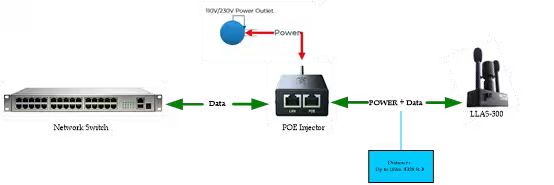
A PoE injector inserts power into the Ethernet cable while maintaining data communication.
Network Topology
Connection Steps
- Connect DATA IN port of the injector to the network switch.
- Connect PoE OUT port to the LLAS-300 sensor.
- Plug the injector into a standard AC power outlet.
- Verify the device powers on.
This method is commonly used for retrofit cinema installations.
Device Status Indicators
The LLAS-300 includes status LEDs to assist with installation verification.
LED Indicator | Status | Meaning |
Power LED | Solid Green | Device powered correctly |
Network LED | Flashing Green/Amber | Active network communication |
If both LEDs behave normally, the device is successfully connected.
Operational Safety
PoE Standard Compliance
The LLAS-300 must be powered using:
- IEEE 802.3af
- IEEE 802.3at
⚠ Do NOT use passive PoE injectors (such as 24V passive systems).
Passive systems may permanently damage the device.
Cable Distance Limitation
Maximum Ethernet cable length:
100 meters (328 ft)
Longer distances may cause:
- Voltage drop
- Network instability
- Device disconnection
Troubleshooting
Device Does Not Power On
Check the following:
- Verify the PoE switch supports 802.3af or 802.3at
- Test using a factory-terminated Ethernet patch cable
- Ensure the cable contains all 8 wires
Intermittent Network Connection
Possible causes include:
- Cable length exceeding 100 meters
- Poor cable termination
- Electromagnetic interference from high-power equipment
Device Not Detected on Network
Ensure:
- LLAS-300 and Cinema Server / TMS are on the same subnet
- VLAN settings allow communication
- Firewall rules are not blocking traffic
Integration Tip for Cinema Systems
For large cinema deployments, using a managed PoE switch allows administrators to monitor:
- Port power consumption
- Device connectivity
- Network traffic
This improves maintenance efficiency and helps quickly identify network issues.